> For the complete documentation index, see [llms.txt](https://docs.flip.to/llms.txt). Markdown versions of documentation pages are available by appending `.md` to page URLs; this page is available as [Markdown](https://docs.flip.to/docs/platform/discovery/experiences/collection-management.md).
# Collection management
Sign into your platform, and head over to **Stories** and click on **Experiences.** You may see a few other collections too depending on your platform, such as [Traveler Stories](/docs/platform/advocacy/stories.md) and [Local Events](/docs/platform/discovery/experiences/flip.to-occasiongenius.md).
## Add a new experience
In a few clicks, add a new experience to your collection. Once in circulation, it will help inspire travelers on your site.
{% stepper %}
{% step %} **In your Experiences collection, click to add a New Experience**
{% endstep %}
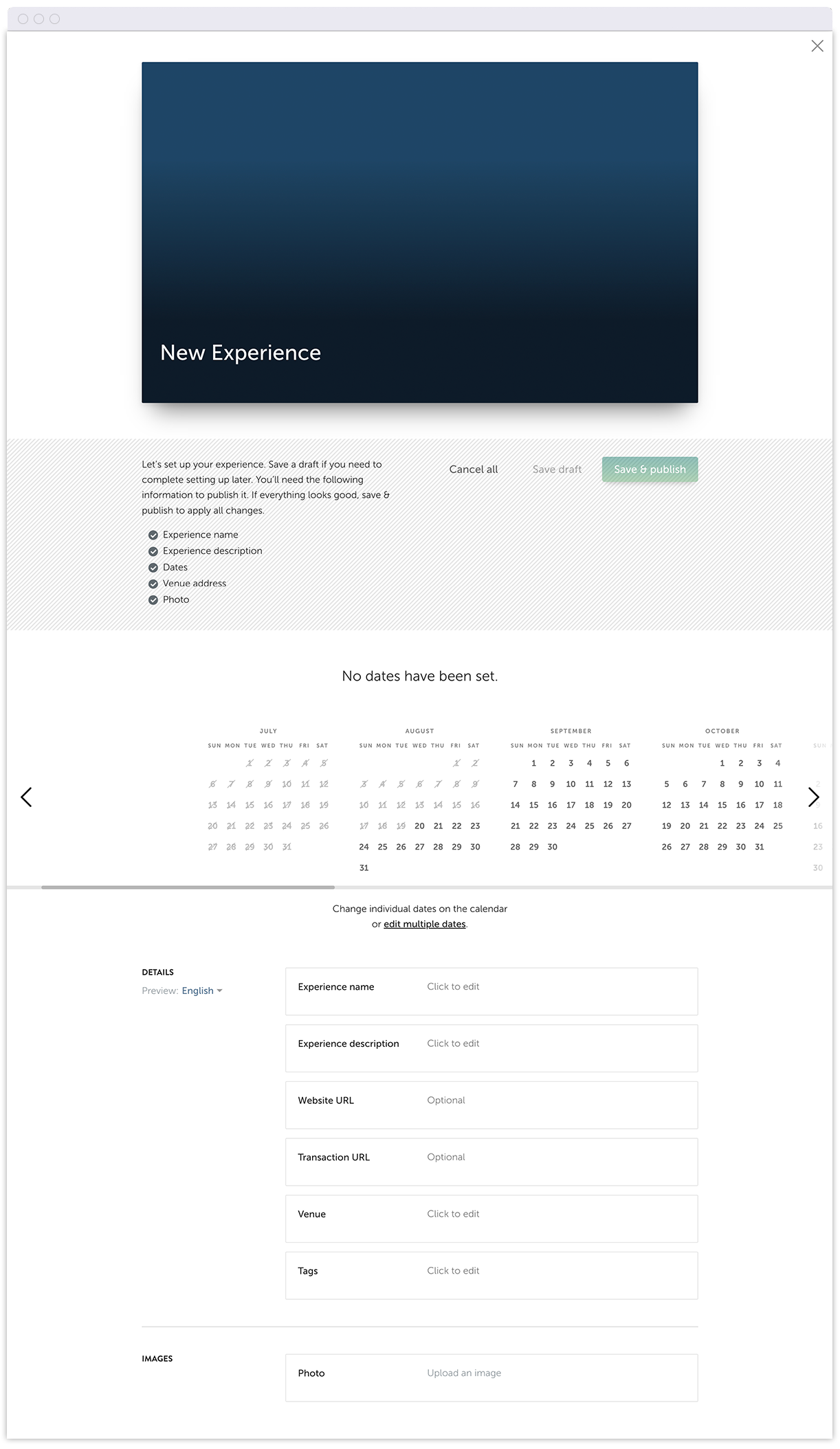
{% step %} **Fill in the dates and details about your experience.**
Be sure to include the experience **name**, **description**, **dates**, **venue address** and a **photo**.
{% hint style="info" %}
**Hint:** look for the green check to ensure that you have everything you need. :white\_check\_mark:
{% endhint %}
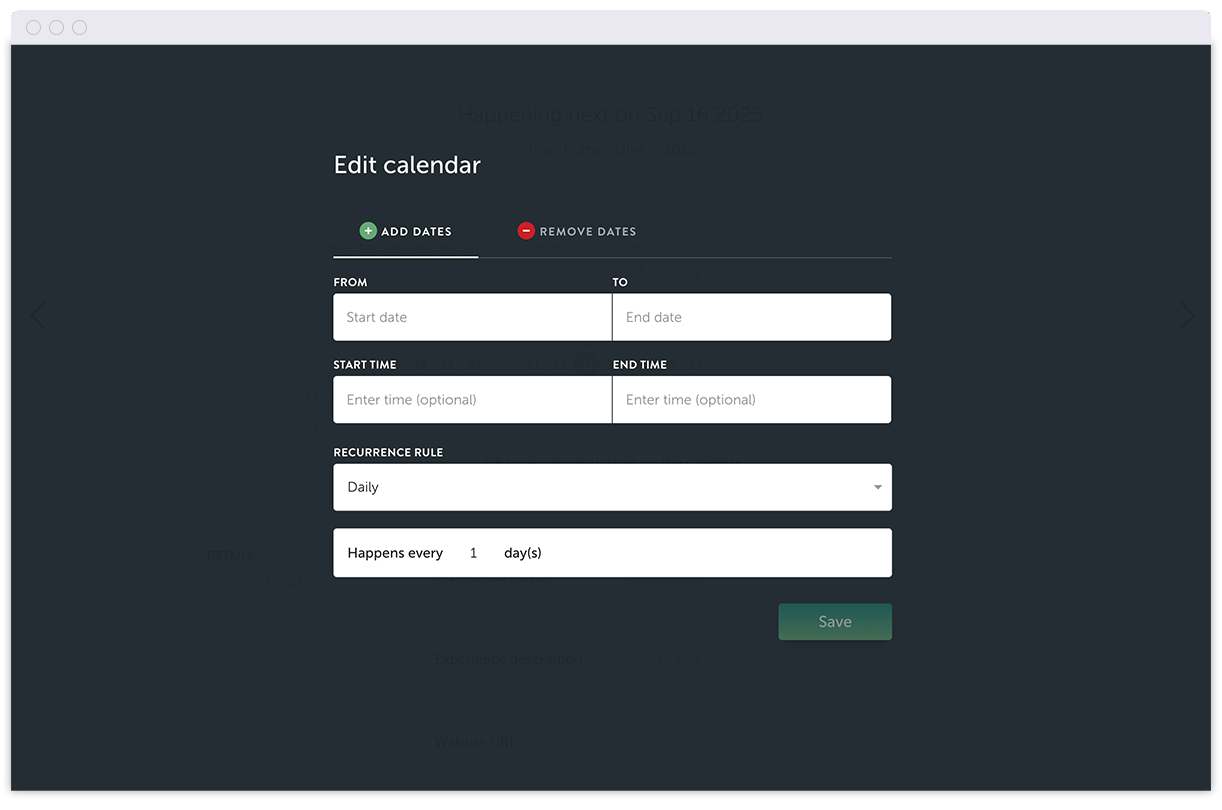
For events and experiences with multiple dates, edit right from the calendar, or have the option for more advanced settings:
**That's it!** If you're not ready to send to circulation, at any time **save your progress as a draft** to come back to.
{% endstep %}
{% step %} **Save and publish**** 🚀**
Visit your site to see your Experience live to the world.
{% endstep %}
{% endstepper %}
## A guide to providing the best experience content
Keeping your content fresh and engaging doesn't have to be tricky. Here's a few best practices that we recommend for the best user experience.
### Descriptions
At this point, aim to inspire (not instruct). Use language that tells a story on why this experience is memorable. Avoid check lists or instructions or policies that are intended for later on.
Here's an example of what we'd recommend:
{% hint style="success" %}
Hike the Hoh Rain Forest along the ever-flowing Hoh River that carves its way from Mount Olympus towards the Pacific Coast.
{% endhint %}
And an example of content that's less important at this time of the journey:
{% hint style="warning" %}
Hike the Hot Rain Forest. Be sure to bring water and review information regarding facilities, picnic areas, camping, and regulations.
{% endhint %}
{% hint style="info" %}
We recommend avoiding the mention of prices. These can often change, and aren't required for inspiring a trip at this point in the buying journey. Right now, get travelers excited about the possibility of a stay.
{% endhint %}
### Images
Here's a chance to highlight your experience in the best way. Choose high-quality, engaging images that belong to you.
{% hint style="info" %}
Here's a check list for your best content:
* Choose images that are at lest 1200px wide x 800px tall. *(Not required, but these will look your best!)*
* Use images that are **owned**, **rights-managed**, or **royalty free**.
* Avoid images with text or watermarks, or images of promotional material, since text about the event will live elsewhere.
{% endhint %}
## Managing published experiences
At any time, head over to your collection and edit any aspect of your experiences—like the description or dates. If an experience has already passed, you may find it in the archive.
***
If you need help adding or managing experiences, or want to switch on Discovery, get in touch with [the friendly team at Customer Success](/docs/support/customer-success.md).
---
# Agent Instructions
This documentation is published with GitBook. GitBook is the documentation platform designed so that both humans and AI agents can read, navigate, and reason over technical content effectively. Learn more at gitbook.com.
## Querying This Documentation
If you need additional information that is not directly available in this page, you can query the documentation dynamically by asking a question.
Perform an HTTP GET request on the current page URL with the `ask` query parameter, and the optional `goal` query parameter:
```
GET https://docs.flip.to/docs/platform/discovery/experiences/collection-management.md?ask=&goal=
```
`ask` is the immediate question: it should be specific, self-contained, and written in natural language.
`goal` is optional and describes the broader end goal you are ultimately trying to accomplish on behalf of the user. GitBook uses it to tailor the answer towards what is most useful for that goal.
The response will contain a direct answer to the question and relevant excerpts and sources from the documentation.
Use this mechanism when the answer is not explicitly present in the current page, you need clarification or additional context, or you want to retrieve related documentation sections.